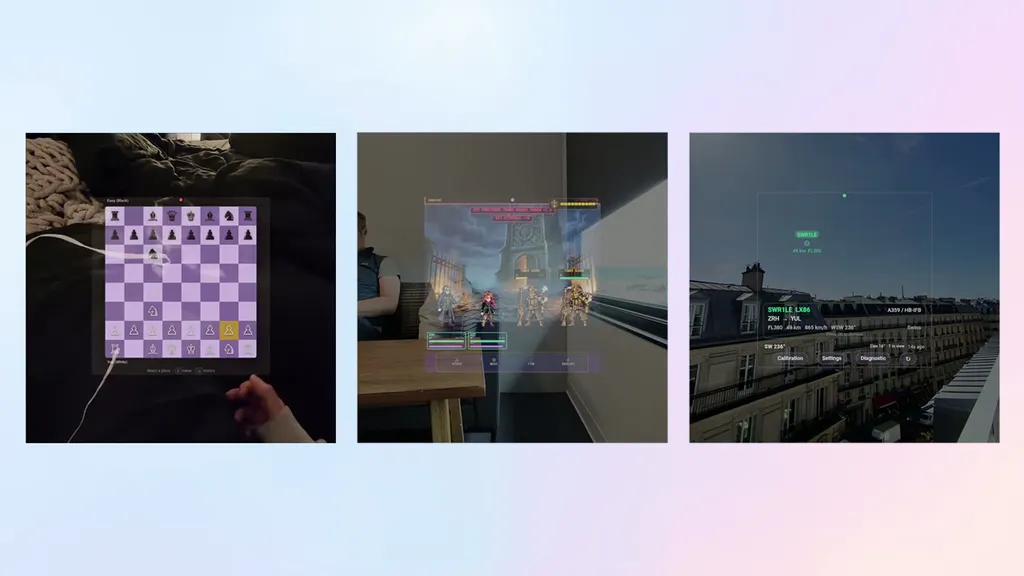
Meta rolled out the ability to develop visual apps for Meta Ray-Ban Display, controlled by Meta Neural Band, and developers are already building interesting things.
Developers have been able to extend their smartphone apps to access the camera and microphone of Meta's smart glasses since December, if the user enables developer mode and grants permission, through the Wearables Device Access Toolkit SDK. But the only output they could send to the glasses was audio via Bluetooth.
Meta's teaser of visual app support for Meta Ray-Ban Display.
Last month, Meta added support for bringing apps to Meta Ray-Ban Display's heads-up display (HUD), through two separate paths: Extended Smartphone Apps and Standalone Web Apps.
Extended Smartphone Apps
The same Wearables Device Access Toolkit SDK developers have been using to access the glasses camera in their smartphone apps can now send UI content to the display.
Within the display area, developers can show text, images, buttons, icons, and videos, using Meta-provided UI components, styled and laid out within FlexBox containers.
Developers implement these components in the same language they likely already use for the rest of the app, Swift for iOS and Kotlin for Android.
For the extended smartphone apps path, raw input from the Meta Neural Band is handled by Meta's operating system. The user can navigate between and click on the buttons developers placed using the same finger swipe gestures they use for the rest of the operating system, and the smartphone app will receive these click events to run code on the phone and update the display.
Essentially, the extended smartphone apps path just lets the HUD be used as a highly managed and controlled external display with button navigation and input, but the core of the app continues to run on the user's smartphone.
Interested developers can find the documentation for this here. Distributing these apps still requires the user to enable developer mode.
Standalone Web Apps
The Web Apps path for Meta Ray-Ban Display is a completely new stack for development on the Meta Ray-Ban Display, where apps made with HTML, CSS, and JavaScript can run natively on the glasses.
This path is far less constrained, letting developers use whatever kind of user interface web framework they want, and provides access to Meta Neural Band swipes and taps, motion and orientation data from the IMU in the glasses, GPS location of the connected phone, and local on-device storage – all using open web standards. And the apps can run without the smartphone connected.
Technically, what Meta did here was just give the glasses the ability to open any web URL in a lightweight on-device browser. But given that the in-lens display is 600×600 and the only available inputs are directional swiping and tapping, most websites are effectively unusable, so the idea here is to build mini web apps specifically designed for Meta Ray-Ban Display.
Developers are responsible for hosting these web apps, and can use any hosting solution they want, as they would with any other website, as long as it supports HTTPS. Meta does not provide hosting. Free options include GitHub Pages.
This approach has the advantage of meaning the apps can be easily and instantly tested and iterated upon without putting on the glasses, using the arrow and enter keys on a keyboard to simulate Meta Neural Band swipes and taps.
The path for adding web URLs as apps to Meta Ray-Ban Display is to navigate to the smartphone app settings, then tap App Connections, then Web Apps, and add the URL. The Codex and Claude Code plugin can also generate a QR code that developers can share to launch into the phone app's Web Apps section, which will automatically ask to add the URL. The user needs to have developer mode enabled for their glasses.
Interested developers can find documentation here.
Full AI Coding Agent Support
For both development paths, Extended Smartphone Apps and Standalone Web Apps, Meta fully supports AI coding agents.
This includes installable plugins for OpenAI's Codex and Anthropic's Claude Code, auto-loaded instructions for GitHub Copilot and Cursor, and a fallback AGENTS.md file for other systems.
Meta also has a public Wearables MCP server for live documentation search, meaning agents can always reference the most up-to-date details on how to properly develop for Meta Ray-Ban Display.
This all makes it possible to "vibe code" apps for the glasses, meaning any owner with basic technical knowledge can build their own information overlays, real-time data displays, micro-apps, utilities, and media streaming tools.
(If you're unaware, AI coding agents have significantly improved in the last year or so, and are now capable of building entire apps without the user ever needing to write their own code).
Display Recording
The firmware update that brings support for building visual apps also brought support for display recording on Meta Ray-Ban Display.
A major issue I faced when reviewing Meta Ray-Ban Display at launch was the inability to show you, our readers, what I was seeing. Sure, you could stick a camera up to the lens, but the waveguide is designed for a human eye, not a sensor, and I've never seen any attempt at this accurately depict what I saw. These camera capture techniques also preclude actually wearing the glasses.
Now, Meta Ray-Ban Display owners can record the display, with the output showing it superimposed on the camera view, and including any playing audio.
This was arguably an essential feature for Meta to ship alongside visual apps, as it lets developers show the world their experiments on social media. It also makes it easier for journalists, influencers, and creators to show off the capabilities of Meta Ray-Ban Display.
Interesting Apps So Far
Since support for building and testing visual apps went live last month, we've seen a number of incredibly impressive initial experiments from developers already.
Some remain private solo demos, while others are available for any Meta Ray-Ban Display owner to use.
While by no means a comprehensive list, here's just a small collection we've noticed:
Ghost Run: Racing Your Past Self
Software developer Stijn Spanhove, of In The Pocket, built a web app that let him race his past self by manually hardcoding in a GPX (GPS Exchange Format) file from a past run recorded by Strava.
The screen leverages the compass of the glasses for orientation and the GPS of the connected smartphone for the location, tracking you and your past self on a blue line representing the path.
Spanhove says he's planning to make a public version of this connected with Strava.
YouTube, TikTok & Twitch Clients
While I don't personally find Meta Ray-Ban Display's monocular display system visually comfortable enough to want to watch videos on it, owners willing to put up with the eye strain had been crying out for wider support than just the built-in Instagram Reels app.
A pseudonymous developer going by the handle AeroSummit has satisfied this need by building Meta Ray-Ban Display web apps for YouTube, TikTok, and Twitch.
Twitch on Meta Ray-Ban Display.
While it's technically already possible to access this site, AeroSummit has crafted a simplified interface designed to fit into the 600×600 display space and work well with only the swipe and tap inputs of the Meta Neural Band.
They're available through Herald Hub, AeroSummit's unified app launcher for the glasses.
DOOM
The original 1993 DOOM has become one of the most widely ported pieces of software in history, and getting it to run on every kind of digital device from thermometers, calculators, and even HDMI adapters has become a fun challenge for hacker-minded developers.
DOOM on Meta Ray-Ban Display.
So naturally, XR developer Timur Abdrakhimov has already ported it to Meta Ray-Ban Display.
An AI Agent That Orders Uber & DoorDash
The most impressive part of Google's I/O demo of the upcoming Warby Parker and Gentle Monster smart glasses was Gemini's ability to agentically operate your connected smartphone to do things like order Uber and DoorDash.
Developer Rohan Arun is building a cross-platform agent called Super, designed to perform agentic actions without the need for a phone, and the first glasses Super supports is Meta Ray-Ban Display.
Arun shared a clip of the app being used to order Starbucks, with no input required beyond voice.
Smart Home Control
The ability to control smart home devices by simply looking at them and tapping your index finger to your thumb is an ideal future use case of XR.
Unfortunately, it's not possible today, at least not without significant manual setup. But the next best thing is being able to control your devices from your glasses with a few swipes of your fingers, without getting up or having to call out to a speaker with your voice.
Krzysztof Wrona, a developer at Mondly, shared a short clip of a demo of exactly this. It's not currently publicly available for others to try.
A Reader-Mode Web Browser
As we described earlier in the article, the technical foundation of web app support on Meta Ray-Ban Display is essentially that the glasses now have a built-in web browser to access web URLs. But given that the in-lens display is 600×600 and the only available inputs are directional swiping and tapping, most websites are effectively unusable.
Another one of AeroSummit's creations is a web browser, a web portal with a simplified interface for DuckDuckGo search that implements a simplified reader mode for the websites you access.
Let Us Know!
If you have an interesting experiment or published web app for Meta Ray-Ban Display, please contact us to let us know.
I'm actively writing on UploadVR again, and this article is one in a series of "catch-up" pieces where I report on some of the interesting things that have been happening in the industry in recent months. And yes, VR Download is coming back soon!